Q TOWER
AI governance made simple
The AI governance hub for your fast-paced organization - policy, approvals, and training, deployed inside your own environment.
Self-hosted. Deployed inside your own environment.
The AI governance hub for your fast-paced organization - policy, approvals, and training, deployed inside your own environment.
Most companies want to govern AI use but don't know where to start - and don't have a compliance department to build it from scratch. So AI adoption runs ahead of oversight, quietly, until it becomes a real problem.
Employees are already using AI tools nobody approved, because there's no clear process for asking.
"We should write an AI policy" has been on the to-do list for months - nobody owns it, so it never gets written.
Even if a policy existed, there's no way to enforce it, track who's trained, or catch an incident before it spreads.
Policy, tool approvals, incident tracking, and employee training - all in one place, self-hosted in your own environment.
Answer a short questionnaire and generate a complete, ready-to-review AI usage policy as a real document - not a template you have to write yourself.
Employees request approval for AI tools, projects, vendors and agents; an AI-assisted precheck calls the AI tool your organization already uses to evaluate the request against your policy and flags risk - a human always makes the final call.
Live training session available now, with self-paced video modules on the way. Completion is tracked org-wide today.
A safe, anonymous way for anyone to flag an AI-related concern, routed straight to the right people with a resolution trail.
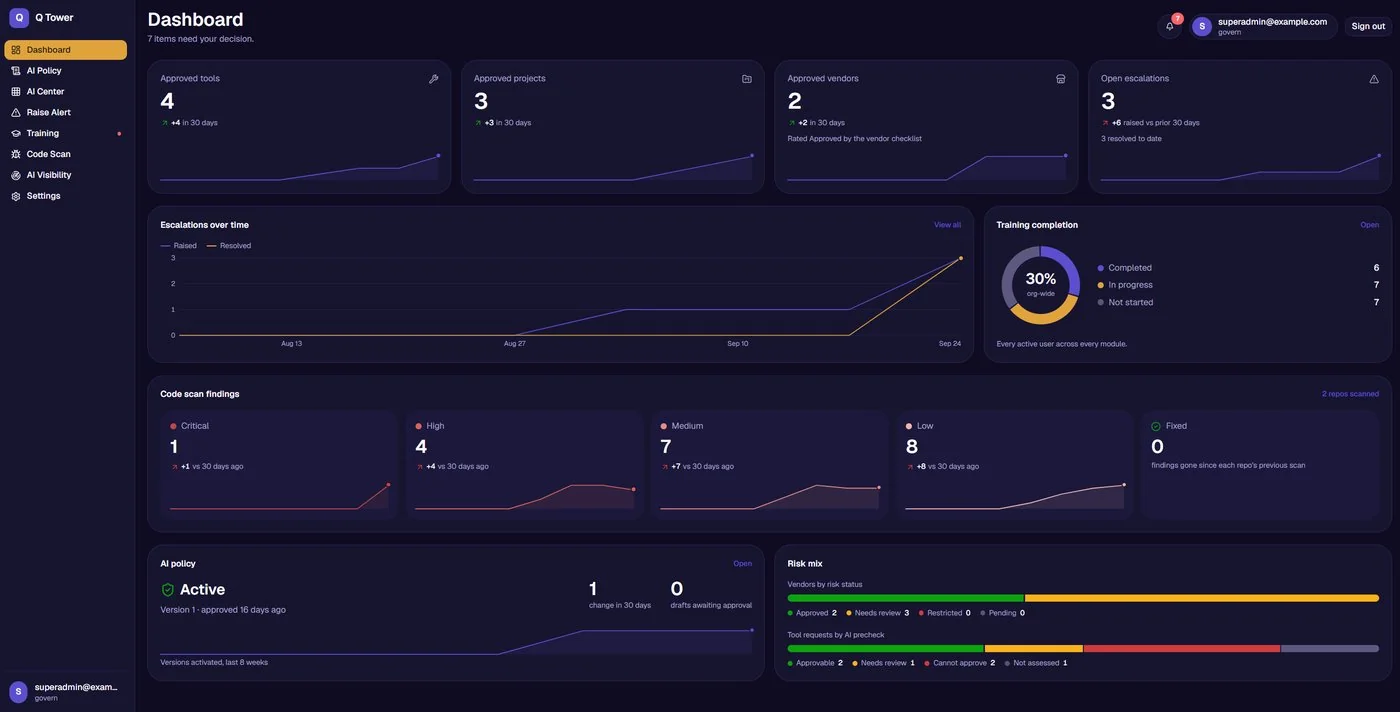
A live register of the AI tools, projects, vendors and agents in use, with approval status and risk mix visible on the dashboard.
A living, browsable list of what's cleared to use, with data-sensitivity guidance built in.
Scans AI-written code in your repos for 30 common vulnerability classes, tracked over time by severity: critical, high, medium, and low.
Open escalations, resolution trends, and policy version history in one view, so you always know what's changed and what needs a decision.
Also available: custom branding for your organization.
Run the Q Tower Docker bundle in your own cloud or on-prem environment. No new servers, no vendor managing your data.
Connect your existing identity provider - Okta, Entra ID, Google Workspace, or any other IdP.
Generate your policy, invite your team, and your AI governance program is live.
What they run: the Q Tower Docker bundle, on a host in your own cloud tenant or on-prem.
What they connect: your existing identity provider (Okta, Entra ID, Google Workspace, or any SAML/OIDC IdP).
What data stays where: everything (policies, tool requests, employee data) stays on infrastructure you control. The one exception is the AI-assisted precheck, which calls the AI tool your organization already uses.
Q Tower runs entirely inside your own environment, shipped as a Docker bundle. Your policies, your tool requests, and your employee data never leave infrastructure you control - there's no external database and nothing to migrate if you ever stop using it.
Works with any identity provider your organization already uses. No separate accounts to manage.
Every policy change is tracked and time-stamped, so you always know what changed, when, and who approved it. Q Tower is not SOC 2 certified or GDPR certified today; these are the real controls in place.
Oversight, execution, and use are cleanly separated by design.
Sets policy, reviews escalations, owns the AI governance program.
Reviews tool requests and incidents, keeps the program enforced day to day.
Requests tools, completes training, uses AI within the approved boundaries.
Planned, no date yet. Today, Q Tower governs AI that is registered or instrumented through it - tools, projects, vendors and agents that go through the approval workflow or are added to the inventory. It does not yet scan your network for AI tools nobody has registered.
Pricing depends on org size and deployment scope - the fastest way to get a number is a short call.
One-time setup fee plus a maintenance and update contract. Early customers: the initial contract covers six months of license, maintenance and updates.
Request pricingA Word doc is a document nobody reads twice. Q Tower turns your policy into a living system: every AI tool request is automatically checked against it, every version is tracked, and every employee's training completion is visible in one place. The policy isn't just written, it's enforced.
Alongside it. Q Tower gives you a strong, structured first draft and an operational layer to enforce whatever policy you land on, but the AI-assisted precheck on tool requests is a flag for a human to review, not a legal determination. We'd always recommend your legal or compliance function reviews the generated policy before you publish it, the same way you would with any policy document.
Not much. Q Tower ships as a Docker bundle your IT team runs in your own cloud tenant or on-prem, on infrastructure you already control; no new servers to provision, no vendor managing your data. Setup is largely copy-pasting a few configuration values, like connecting your existing identity provider, rather than a technical integration project - designed to deploy in a day or two. The initial contract covers six months of license, maintenance and updates.
Q Tower itself runs entirely inside your own environment: your policies, tool requests, and employee data never leave infrastructure you control, and there's no external database or third-party storage. The one exception is the AI-assisted precheck, which calls the AI tool your organization already uses - with your own API key - to evaluate a request against your policy; point it at a self-hosted model and even that stays fully internal.
Not yet; it's planned. Today, Q Tower governs AI that is registered or instrumented through it - tools, projects, vendors and agents that go through the approval workflow or are added to the inventory.
Whichever AI tool your organization already has access to, called with your own API key. Q Tower does not run or host a model itself. If you point it at a self-hosted model, the precheck stays fully inside your environment too.
Yes. Custom branding for your organization is available.
Book a demo and see Q Tower deployed against a scenario from your own organization.